chidori
AI-powered IDE with a built-in reasoning engine.
Ask, Agent, Plan, or Debug — local and remote LLMs, file explorer, editor, and terminal in one app. Pair an Android phone as companion or inference node.
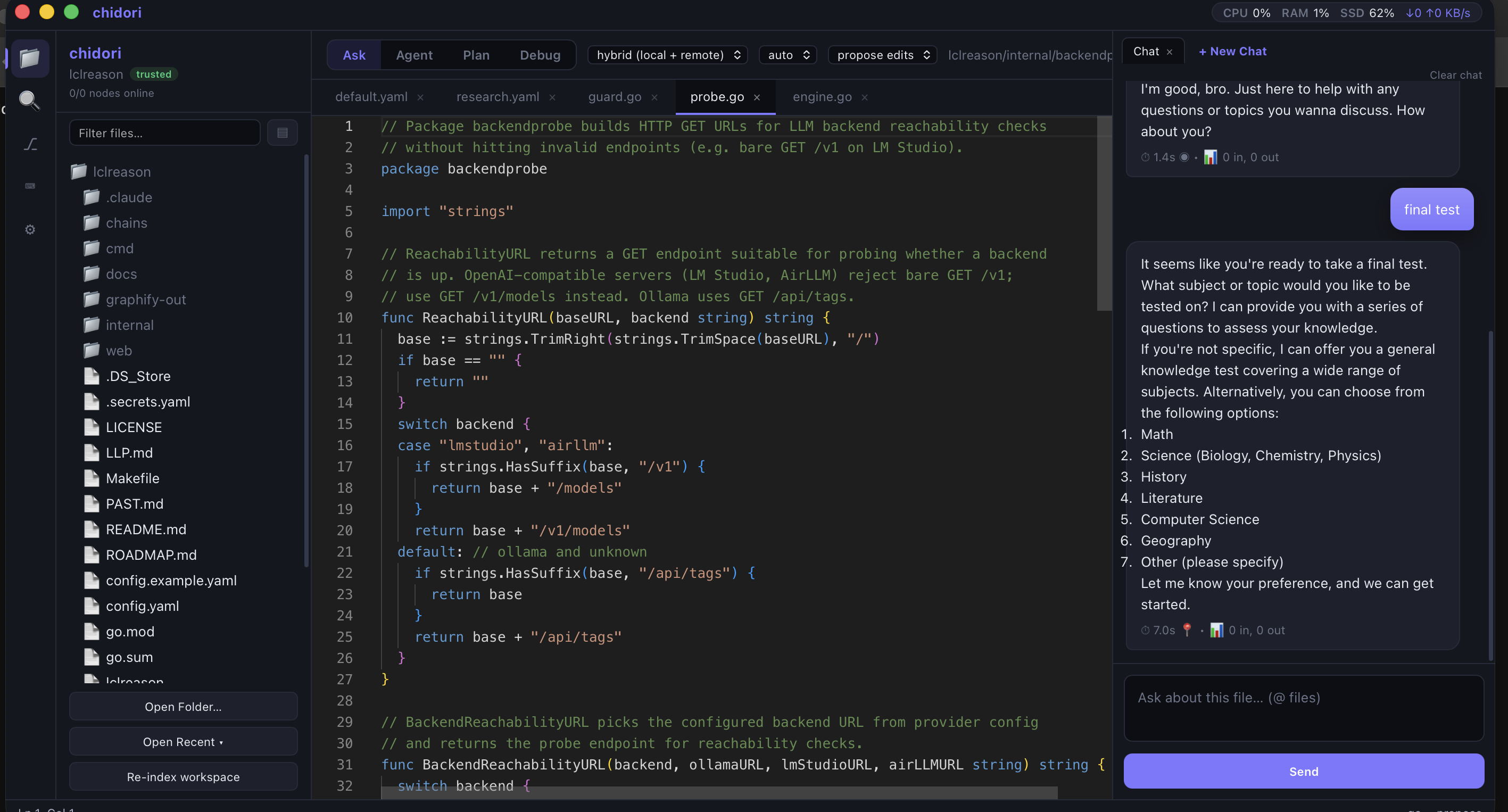
Ask mode — editor + AI chat side by side
Screenshots
Real screenshots, not mockups (captured from a live coordinator session). Click any image to enlarge.
Click to enlarge
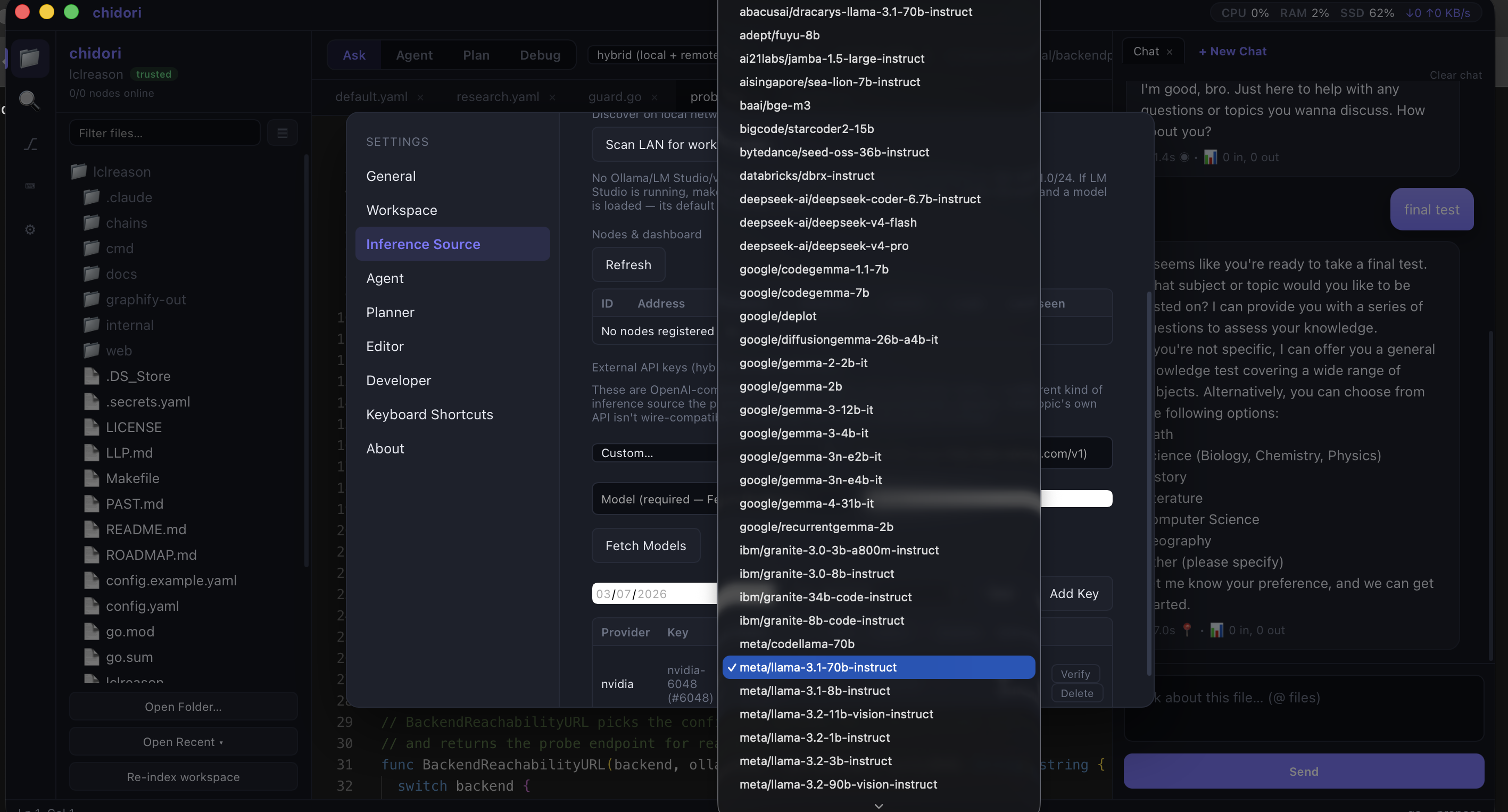 Click to enlarge
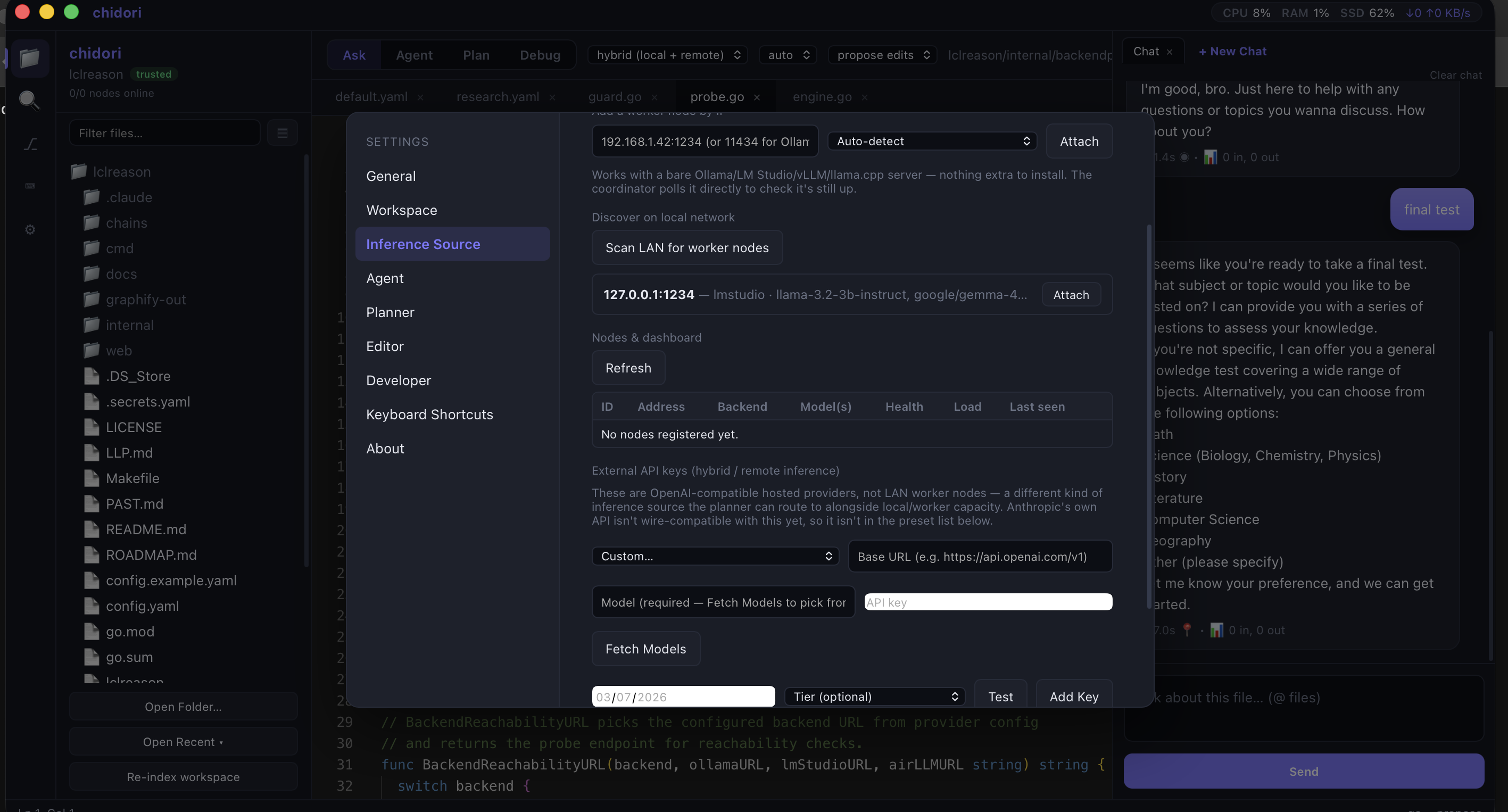 Click to enlarge
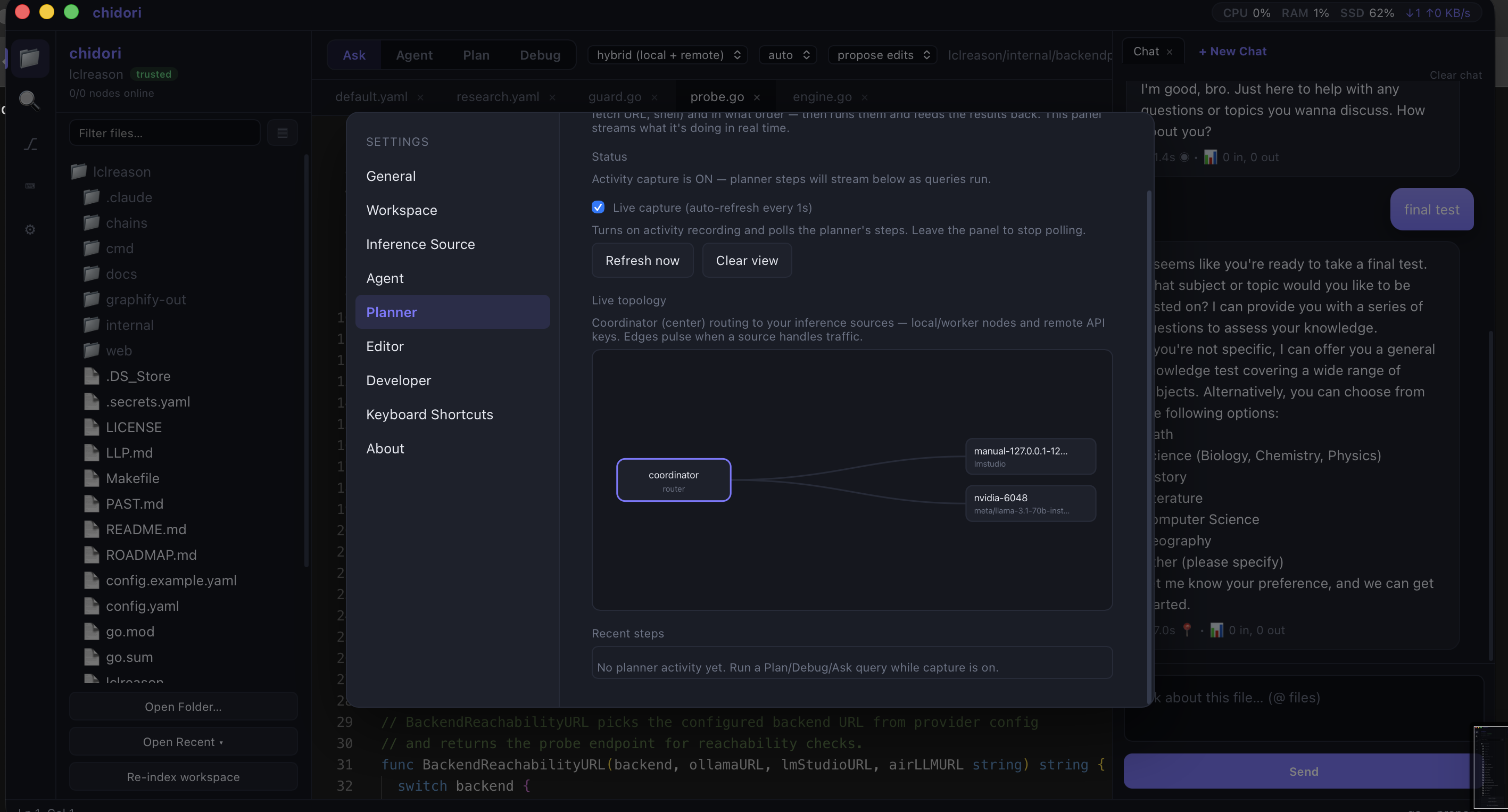 Click to enlarge
Download
Pick a desktop platform. Packages ship from xdutsuay/chidori (releases only). The Android companion source is xdutsuay/chidori-nagasa. A non-debuggable release APK is not published yet, so this page does not offer a companion download.
macOS
Apple Silicon
M1–M4. Unzip and open chidori.app. Not code-signed yet — right-click → Open on first launch.
curl -LO https://github.com/xdutsuay/chidori/releases/download/v0.6.0/chidori-macos-arm64-v0.6.0.zip
Windows
x64 desktop
Unzip and run chidori.exe. No installer — portable folder.
curl.exe -LO https://github.com/xdutsuay/chidori/releases/download/v0.6.0/chidori-windows-amd64-v0.6.0.zip
Linux
x64 desktop
Unzip and run ./chidori. Needs webkit2gtk 4.1.
curl -LO https://github.com/xdutsuay/chidori/releases/download/v0.6.0/chidori-linux-amd64-v0.6.0.zip
Not on this OS? Show the other downloads
System requirements
- macOS — 10.10+, Apple Silicon only for the published zip
- Windows — 64-bit Windows 7+
- Linux — x64. Unzip and run
./chidori. Needs webkit2gtk 4.1 - Android companion — public source only. A non-debuggable release APK is not published yet
- Optional — Ollama or another local OpenAI-compatible server for desktop inference
All desktop releases · Android companion source
macOS may warn that chidori is not code-signed. Here's how to open it.
Right-click chidori.app → Open → confirm Open.
Gatekeeper does this on first launch for unsigned apps — it is not a malware scan result.
Signing and notarization are not in v0.6.0.
Get updates
No mailing list yet. Watch GitHub releases or add the Atom feed to any reader (many readers can email you). Same feed as the changelog.
What's new in v0.6.0
Published 2026-10-06. macOS arm64, Windows x64, and Linux x64. Full notes on the changelog.
-
Linux desktop package
x64 zip: unzip and run
./chidori. Needs webkit2gtk 4.1. - API keys stay sealed Provider keys are sealed at rest on the machine.
- Linear from Settings Connect Linear in Settings. You bring your own API key.
- Copy a message, edit the last prompt Copy the full message, or revise the last prompt and send it again.
- Explorer polish Changed files are easier to see, and directories keep their trailing slash.
- Windows crash capture When the Windows build crashes, diagnostics are captured so the failure is easier to report.
- OpenAI tool calls stream Native streaming for OpenAI tool calls, instead of waiting on the whole turn.
What's next
Not a dated promise — these are the next public pieces already in motion.
-
Source
Android companion Public source for LAN pairing, monitor, remote chat, and optional phone-as-node. A non-debuggable release APK is not published yet, so this site does not offer a download. See Companion mobile app.
-
Next
CLI inside the packaged app
chidori askon PATH from the .app, without a separate install step. -
Later
Signed macOS builds Notarization so Gatekeeper stops asking you to right-click Open. No date yet.
AI Reasoning Modes
Four integrated modes for different coding tasks — each with direct access to your codebase and local/remote LLMs.
- Code EditorFile tree, syntax highlighting
- TerminalIntegrated shell access
- SettingsLLM config, inference source
- Project MgmtWorkspace indexing
- UI ThemeDark mode native
- AskDirect Q&A with codebase
- AgentAutonomous coding tasks
- PlanArchitecture & investigation
- DebugError diagnosis & fixes
- InferenceLocal or remote LLMs
Getting started
Prerequisites: macOS 10.10+ (Apple Silicon), 64-bit Windows 7+, or Linux x64 with webkit2gtk 4.1. Optional: Ollama for local LLM inference.
-
Download
Get the Apple Silicon zip from the Download section (or latest release).
-
Extract
cd ~/Downloads
unzip chidori-macos-arm64-v0.6.0.zip
-
Launch
Open Finder and double-click
chidori.app. If macOS blocks it, use the Gatekeeper steps in Download. -
Configure LLM (optional)
Go to Settings → Inference Source to connect to Ollama or a remote LLM API.
-
Download & extract
cd $env:USERPROFILE\Downloads
Expand-Archive chidori-windows-amd64-v0.6.0.zip
-
Launch
Open the extracted folder and double-click
chidori.exe. -
Configure LLM (optional)
In the app, go to Settings → Inference Source to connect Ollama or remote LLM.
-
Start coding
Open a folder and start using the Ask, Agent, Plan, or Debug modes.
-
Download & extract
cd ~/Downloads
unzip chidori-linux-amd64-v0.6.0.zip
-
Launch
From the extracted folder, run
./chidori. The build needs webkit2gtk 4.1. -
Configure LLM (optional)
In the app, go to Settings → Inference Source to connect Ollama or a remote LLM.
-
Public release repo
Binaries live in github.com/xdutsuay/chidori — a releases-only public repo (no application source). Prefer the Download buttons above or the Releases page.
-
CLI download (optional)
Prefer a one-liner? Copy the curl from the Download section for your OS, or:
curl -LO https://github.com/xdutsuay/chidori/releases/download/v0.6.0/chidori-macos-arm64-v0.6.0.zip
# or
curl.exe -LO https://github.com/xdutsuay/chidori/releases/download/v0.6.0/chidori-windows-amd64-v0.6.0.zip
# or
curl -LO https://github.com/xdutsuay/chidori/releases/download/v0.6.0/chidori-linux-amd64-v0.6.0.zip
LLM Configuration
chidori supports multiple inference sources:
Local Ollama
http://localhost:11434
Run Ollama locally and chidori will auto-detect it.
Remote API
https://api.openai.com/v1
Configure any OpenAI-compatible API endpoint.
Custom Endpoint
Self-hosted LLM
Point to your own LLM server running anywhere.
Hybrid Mode
Local + Remote
Use local LLM primarily, fallback to remote.
Architecture
Show the component stack
┌─────────────────────────────────────┐
│         chidori IDE                 │
├─────────────────────────────────────┤
│ File Explorer │ Editor │ Terminal   │
├──────────────────────────────────────┤
│     AI Reasoning Engine              │
│  (Ask / Agent / Plan / Debug)        │
├──────────────────────────────────────┤
│   Inference Coordinator              │
│  (Local Ollama / Remote API)         │
├──────────────────────────────────────┤
│ LLM Backend (Hybrid Local+Remote)    │
└─────────────────────────────────────┘
Key Features
File Tree
Project Explorer
Browse and open files in your workspace
Code Editor
Syntax highlighting
Familiar code editing experience
Terminal
Integrated Shell
Run commands without leaving the app
Settings
Configuration
Manage LLM, workspace, and editor settings
How it works — components
Native Desktop App
Built with Wails — Go backend, vanilla JS frontend. Native macOS, Windows, and Linux binaries.
AI Modes
Four interaction patterns — Ask for answers, Agent for autonomous tasks, Plan for architecture, Debug for error resolution.
Inference Coordination
Unified interface for local (Ollama) or remote (OpenAI, custom) LLM endpoints. Auto-detection and fallback support.
IDE Features
Full editor with file tree, syntax highlighting, integrated terminal, and configuration management built-in.
Companion mobile app
.debug suffix.
Desktop binaries stay on
xdutsuay/chidori.
Source
chidori-nagasa
Fork of LM Playground with LAN pairing, monitor, remote chat, and phone-as-node. MIT licensed. Companion binaries are not offered here until a non-debuggable release APK exists.
View sourcePairing
Same Wi‑Fi
Once you have a build of your own: desktop Settings → Companion must be listening. The phone discovers it via mDNS, or you type host:8027.
Getting started · Configuration · Changelog · LLM Lab (legacy)